Ongoing project
Linux home server
Ubuntu Server and Docker
A general-purpose home server that runs Plex for my media and Minecraft servers for me and my friends. I've run it since 2023, and next I plan to manage its configuration from a GitHub repository.
Goal
The goal of this project is to keep the server's configuration in a GitHub repository. That gives me a history of every configuration change, makes the configuration easier to manage remotely, and lets this page link to the changes it describes. Portainer (Docker management tool) will poll that repository and redeploy whenever the configuration changes. Passwords and keys will stay out of the repository.
None of the server's configuration is on GitHub yet. I'll move the service configurations one at a time, starting with Plex, and set up the deployment once everything is in the repository. This page will record each step.
Current setup
I bought the server in October 2023: a Dell OptiPlex 3040 that a local shop sold for parts. Before buying it, I tested what was left of it in the shop with parts borrowed from their other machines. It came with an Intel Core i5-6500 but no memory or drives. I added 16 GB of DDR3L memory, a 500 GB Samsung SATA SSD, a 3 TB Seagate IronWolf NAS drive, and an AMD Radeon Pro WX 2100 for hardware transcoding in Plex, and replaced the CPU's thermal paste. Some of these were parts I already had and some I bought online, and I did some light modding to make the SSD and hard drive fit.
I chose Ubuntu Server LTS for long-term stability without the overhead of a desktop environment, and the server still runs it (version 26.04.1 today). At first it ran only Plex. When I wanted to host a Minecraft server with PufferPanel (game server management), I set up Portainer Business Edition on its free license and learned Docker, which I thought appeared too complicated before. I moved Plex into a container, then added PufferPanel and later Tautulli (Plex statistics).
In October 2026 I moved the SSD, the IronWolf drive, and the WX 2100 into a Dell OptiPlex 5060 with an Intel Core i7-8700 (six cores, twelve threads) and 16 GB of DDR4 memory, and replaced that CPU's thermal paste as well. On October 26 I added another 16 GB, for 32 GB in total, all running at 2133 MT/s. The same day, I replaced the 5060's power supply with a Delta Electronics unit. Plex now uses the i7-8700's integrated Intel GPU for hardware transcoding instead of the WX 2100, which I left installed.
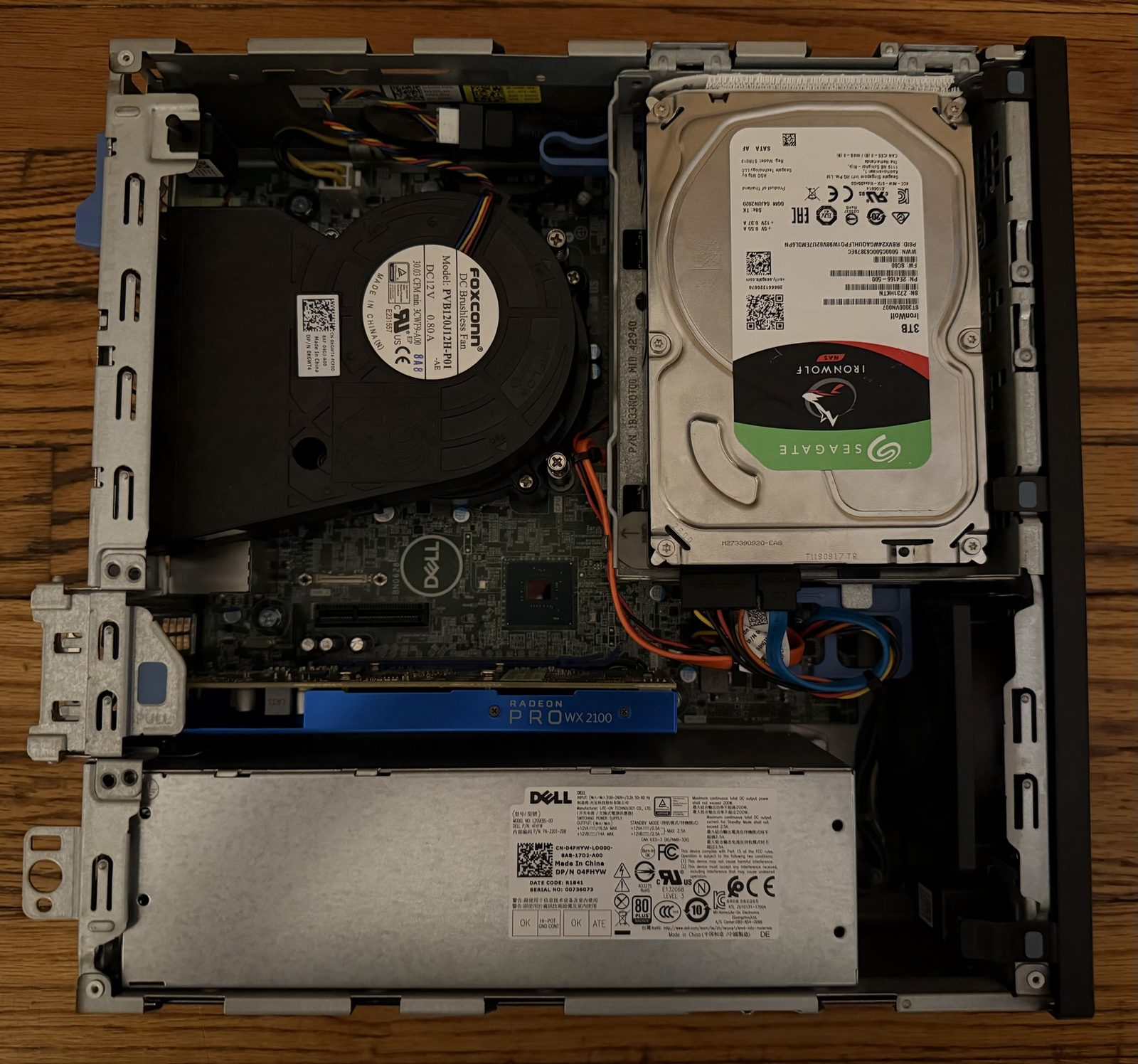
Watchtower checks the Portainer, PufferPanel, Plex, and Tautulli images for updates at 4:17 each morning and installs them. The Minecraft server containers are managed and updated through PufferPanel instead.
Most upkeep is routine and too small for its own log entry: managing the Plex library, running the Minecraft servers (which sometimes means troubleshooting mods), etc.
Decisions
Docker and Portainer instead of installing each service directly
Plex was first installed directly on Ubuntu, and I could have added PufferPanel the same way. Instead, I moved everything into Docker containers managed through Portainer. Each service runs in its own container, so I can restart one without affecting the others, control what each one can access, and keep services and their environment variables from interfering with each other.
Docker Hub for the Plex and Tautulli images
In early October, scheduled updates ran into rate limits on GitHub's container registry, where LinuxServer.io publishes its Plex and Tautulli images. The same images are also on Docker Hub. I had Codex compare the images on both registries and it confirmed they were identical when checked, so I switched Plex and Tautulli to Docker Hub and kept the same publisher. While the logs didn't directly trace each failed run, subsequent debug runs from October 11 to 14 all completed successfully.
Portainer polling GitHub instead of a webhook
Portainer can deploy from a Git repository and pick up changes either by polling the repository or through a webhook. A webhook would mean exposing Portainer to the internet so GitHub could reach it, which I'd rather avoid. Portainer will poll the repository on a set interval instead.
The Intel GPU instead of the WX 2100 for Plex
Getting a newer Intel GPU for Plex was the main reason I moved to the OptiPlex 5060 (along with a good deal on eBay). Plex could have kept using the WX 2100 for hardware transcoding, but Intel's 8th-generation and newer processors handle transcoding better, especially several streams at once, and Plex officially supports them. The switch fixed transcoding problems my dad had when streaming from the server, and the colors that sometimes came out wrong in my own playback. I left the WX 2100 installed simply because I already had it.
My work and AI assistance
What I did (or do)
- Bought the OptiPlex 3040 for parts, tested it in the shop, added the memory, drives, and graphics card, and replaced the CPU's thermal paste.
- Installed Ubuntu Server and Plex, then set up Portainer, PufferPanel, and Tautulli in Docker.
- Manage the Plex library and the Minecraft servers, and troubleshoot mod problems as they come up.
- Chose which services Watchtower updates, and approved the changes Codex made to it.
- Redeployed Plex and Tautulli from Docker Hub in Portainer.
- Moved the drives and the WX 2100 into the OptiPlex 5060 and replaced its CPU's thermal paste.
- Ran the commands to fix the Ethernet device mapping on the new hardware.
- Switched Plex to the Intel GPU and corrected its device mappings in Portainer to expose only that GPU.
- Forced a test transcode and confirmed hardware decoding and encoding in Plex's dashboard.
- Decided to move the configuration to GitHub, with Portainer polling the repository instead of a webhook.
- Tested another lamp and another power strip to narrow my lamp's flicker down to its circuit, traced it to the server, and replaced the server's power supply.
- Installed another 16 GB of memory and confirmed that Ubuntu detected all of it.
How I used AI tools
- Had Codex diagnose Watchtower after it stopped, then deploy the maintained fork I approved.
- Had Codex compare the Plex and Tautulli images on both registries before I switched them.
- Had Codex identify the cause of the Ethernet device mapping problem on the new hardware and find the fix in Ubuntu's documentation.
- Had Codex inspect the GPUs, drivers, device paths, and Plex's startup error after the hardware move, and check the server once Plex was fixed.
- Used Codex to review Watchtower's update runs and record each investigation in a report.
- Had Codex find LED bulbs less likely to flicker and threads from people with similar problems, then research replacement power supplies from reputable manufacturers that would fit the OptiPlex 5060.
- Used Claude to draft this page from my notes, check Portainer's documentation on polling a Git repository, and resize the photo and remove its metadata.
Checks
The latest result for each kind of check. Checks for each change are in the update log.
| Check | Last checked | Result |
|---|---|---|
| All 32 GB of memory detected, at 2133 MT/s | Me, Oct 26 | Passed |
| Watchtower updates for the four services, daily runs from October 11 to 14 | Codex, Oct 14 | Passed |
| The four services respond on the server after updating | Codex, Oct 14 | Passed |
| Hardware transcoding on the Intel GPU during playback | Me and Codex, Oct 11 | Worked |
| Drives, network, and SSH on the new hardware | Me and Codex, Oct 11 | Passed |
Update log
-
Doubled the memory to 32 GB
I installed 16 GB of DDR4 memory from a friend's OptiPlex 7040 (thanks for the RAM, Tyler!), bringing the server to 32 GB. The added memory is slower, so all of it now runs at 2133 MT/s instead of 2666 MT/s. I think the extra memory is worth more than the lost speed, especially since it was free.
Checked: I confirmed in Ubuntu that all 32 GB was detected and running at 2133 MT/s.
-
Replaced the power supply
My lamp started flickering after I set up the OptiPlex 5060. My apartment was built in 1910, and I thought old wiring, together with LED bulbs being more sensitive to small voltage changes, could explain it (and I still think that's part of it). I had Codex research LED bulbs less likely to flicker, but mine was already one of the best it found. A different lamp with a different bulb flickered on the same circuit too, and so did the lamp on a different power strip, so the problem was voltage changes on that circuit, not the lamp, the bulb, or the power strip. I also had Codex search for threads from people with similar problems, and one on Reddit described fixing it with a new power supply. Then I noticed that turning off the server stopped the flicker. Oddly, the lamp flickered even while the server was idle.
I had Codex find replacement power supplies from reputable manufacturers that would fit the 5060, and I bought a Delta Electronics power supply with an 80 Plus Platinum efficiency rating on eBay for $25. I still can't confirm the exact cause of the flicker, but I haven't noticed any since. Afterward, I read that a computer power supply with poor filtering can put electrical interference into a home's wiring and make voltage-sensitive electronics, like LED bulbs, flicker.
Checked: I haven't noticed the lamp flicker since the new power supply went in.
-
Watchtower checked after the hardware move
Codex reviewed Watchtower's runs from October 11 to 14. Each run checked all four services without a failure, and the October 11 run installed a Tautulli update. With my approval, Codex then switched Watchtower from the debug logging used during the repair back to normal logging.
Checked: Codex confirmed that all four services responded on the server, and that Watchtower and the services were running after the logging change.
-
Moved to the OptiPlex 5060
I moved the drives and the WX 2100 from the OptiPlex 3040 into the OptiPlex 5060, and the existing Ubuntu installation booted. Ethernet didn't work at first because its device mapping was wrong after the move. Codex identified the cause and found the fix in Ubuntu's documentation, and I ran the commands to apply it. Plex didn't start, because its device mapping pointed to a GPU device path that no longer existed. The device numbers had also shifted: the one that used to be the WX 2100 now belonged to the Intel GPU, so the old numbers couldn't be trusted to identify either one. Codex inspected the GPUs, drivers, device paths, and Plex's startup error. I then corrected Plex's device mappings in Portainer to expose only the Intel GPU.
Checked: Codex and I confirmed that the drives, network, and SSH worked on the new hardware and that Plex started with the corrected mappings. I forced a transcode and saw hardware decoding and encoding in Plex's dashboard, and while it played, Codex confirmed the Intel GPU was doing the work.
-
Repaired Watchtower
Watchtower had stopped. Codex's read-only checks found that it had no restart policy and was configured with a Docker API version too old for the server's Docker, though the logs didn't show why it first stopped. I chose four services for automatic updates and had Codex deploy a maintained fork of Watchtower, which I approved. I had Codex run a one-time check in monitor-only mode, then scheduled monitor-only checks, before I approved scheduled updates. When image pulls from GitHub's container registry then hit rate limits, I decided to move Plex and Tautulli to Docker Hub (see Decisions). Changing a container's running image doesn't change the configuration Portainer saves for it, so Codex checked both.
Checked: before the replacement could update anything, Codex confirmed it could connect to Docker and had selected only the four services. On October 8, a scheduled run updated Portainer.
-
Built from a for-parts OptiPlex 3040
Set up with Ubuntu Server and Plex, later moved to Docker. This log is detailed from October 2026 onward.
Checked: I tested the remaining parts in the shop before buying, and checked that the services I set up worked as expected.
Planned next
- Move the service configurations to a GitHub repository one at a time, starting with Plex.
- Deploy them in Portainer from the repository with polling turned on, and test that a change in the repository reaches the server.
- Remove a service and redeploy it from the repository to confirm it comes back with the same settings.
- Test that the server can handle three or four transcodes at once, the most I expect at one time.
- Link to the configuration repository from this page.